
Powerful Scheduling
Advanced Playlist Management with Cron-Style Patterns
Scheduling Types & Actions
Our system provides both one-time and recurring scheduling using standard cron expressions for precise, automated control.
Playlist Control
Manage playlist playback with start, stop, and repeat actions.
Power Management
Schedule display on/off times to save energy and prolong hardware life.
System Operations
Automate device reboots and data clean-up for optimal performance.
Hardware Control
Control hardware relays and other connected peripherals via our hardware control features.
Graceful Playlist Transitions
Control exactly how playlists switch. Choose between immediate, forceful takeovers or smooth, natural transitions.
Graceful = True
Waits for the current track to finish playing before switching to the new playlist, ensuring a seamless viewer experience.
Graceful = False
Immediately switches to the new playlist, interrupting any currently playing content for high-priority messages.
One-Time vs. Forever Playback
Configure playlists for single-run campaigns or continuous looping content with fine-grained control.
Forever Playback
Set `forever=true` for a playlist to repeat indefinitely until it's manually stopped or replaced by another schedule.
Limited Repetitions
Use `forever=false` with `repeat_count` to play a playlist a specific number of times, perfect for promotions or limited-time offers.
Real-World Business Cases
Apply advanced scheduling to solve real-world challenges across various industries, from hospitality to industrial settings.
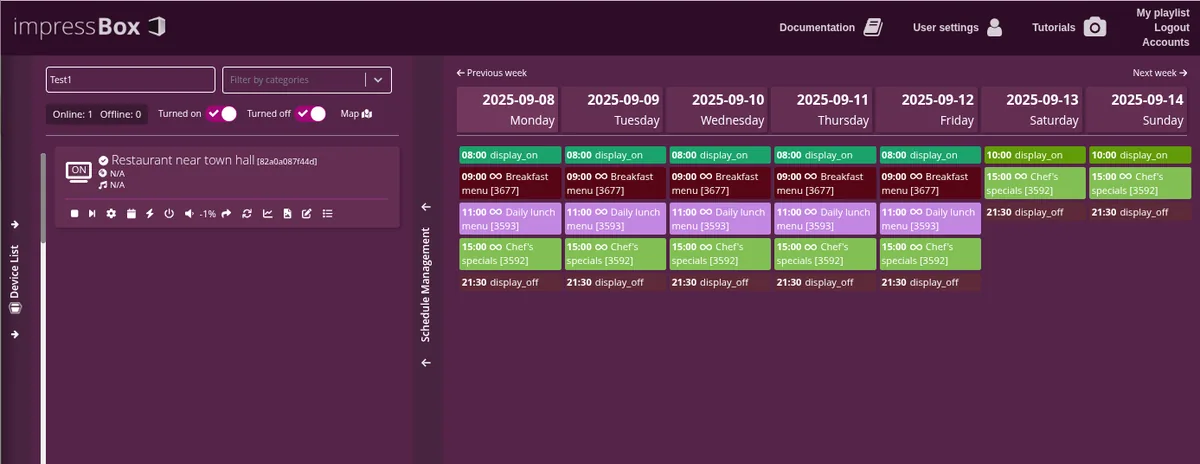
Restaurant Menu Rotation
Automatically switch between breakfast, lunch, and dinner menus with `graceful=true` for smooth transitions.
Hourly Announcements
Broadcast hourly announcements with `graceful=false` to ensure they interrupt other content and are heard immediately.
Alcohol Sale Compliance
Instantly display compliance messaging at specific times (e.g., 10 PM) using `graceful=false` for immediate content override.
Factory Energy Management
Schedule display power-off during non-working hours to save energy, using `graceful=true` to avoid interrupting active processes.
Ad Content Rotation
Rotate ad campaigns every 15 minutes with smooth, graceful transitions to maintain viewer engagement.
Unique Three-Layer Architecture
Our robust scheduling system ensures reliability and intelligence, setting it apart from standard digital signage solutions.
Intuitive Interface
Easily create complex schedules with datetime or cron patterns.
Reliable Gateway
The backend manages and syncs schedules with all devices.
Smart Player
The device itself calculates schedules locally, ensuring operation even during network issues.