
WhatsApp & Slack
Run your digital signage from WhatsApp
With impressBox you can run your screens from WhatsApp: send the impressBox AI Agent a request or a photo in plain language, and it publishes, schedules and checks content on your screens, asking you to confirm before sensitive actions.
What you can do from WhatsApp
WhatsApp is one of the channels of the impressBox AI Agent, so a message can do what the agent does elsewhere.
Put a photo on screen
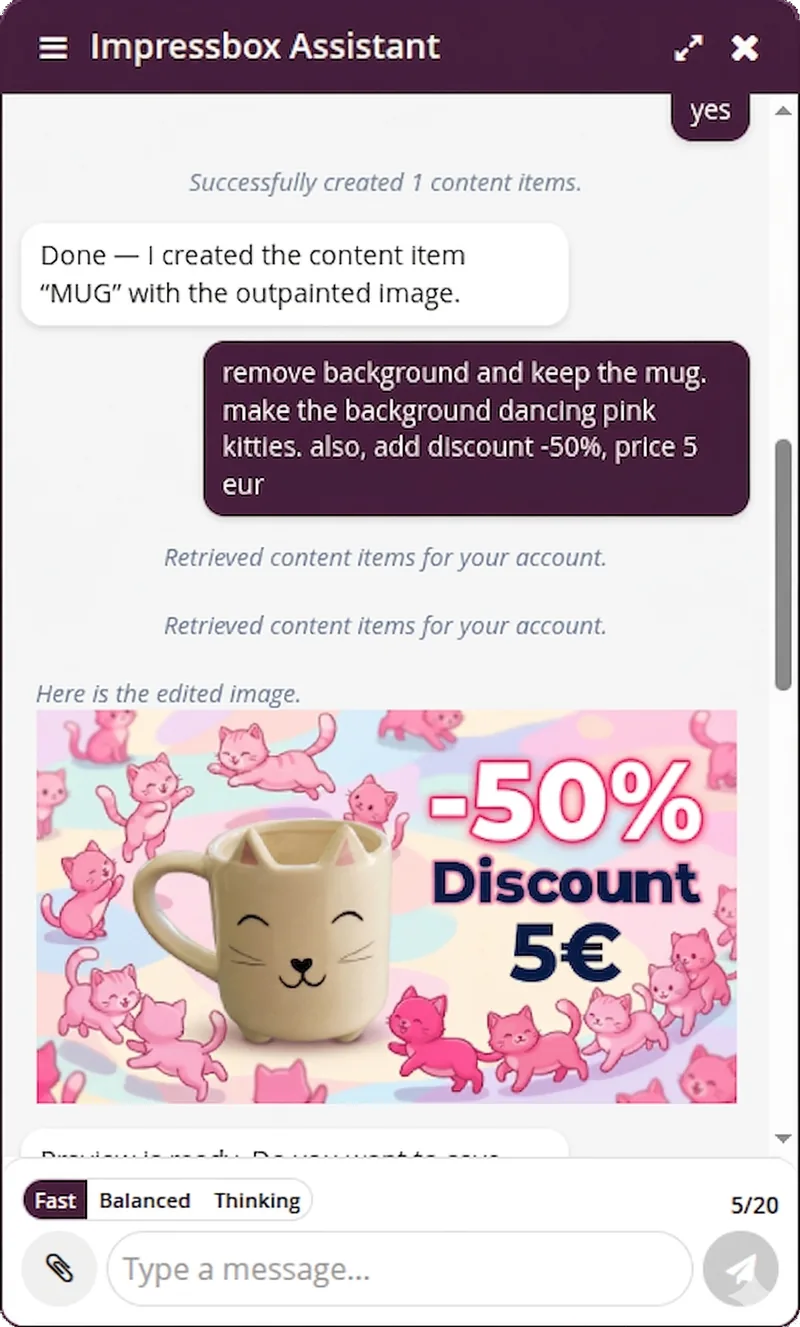
Send a photo and say where it should play. The agent can edit it first, for example remove the background or add a price, and then publish it.
Schedule and rotate content
Start a file tomorrow at 12:00, play it every working day, or keep it running until the end of the month.
Check the screens
Ask whether the screens are really playing the new version, or which screens are offline.
Control the devices
Change the volume, turn a display on or off, or restart a player, without opening the dashboard.
Example messages
From the impressBox prompt library; each one works as a single message.
“Play only this file on the device named Lobby. Name this content Mug.”
Sent with a photo: creates the content item and publishes it to the Lobby screen.
“Remove the background and keep the mug. Add a -50% discount and the price 5 EUR.”
Edits the photo with generative AI and saves the result as new content.
“Start playing this file tomorrow at 12:00.”
Schedules the playback.
“Play these files alongside what is playing now until the end of this month.”
Adds the files with an end date, so they stop on their own.
“Set the device volume to 20%.”
Changes the volume on the device.
“Could you verify that the devices are really playing the new revision?”
Checks that each screen downloaded and started the content, and flags any that did not.
Seen at Digital Signage Summit Europe 2026
At the impressBox booth in Munich (20–21 May 2026), visitors sent a selfie on WhatsApp. The AI agent turned it into a superhero poster with the visitor’s name and a tagline, and put it on the screen at the booth within about a minute.
Read about the demoSafety and permissions
A chat app is only a new way in; the rules stay the same as in the dashboard.
Your account’s permissions
The agent acts with your account's existing roles and policies.
Confirmation first
Before a sensitive action, the agent asks you to confirm in the chat.
Auditable
Every change the agent makes can be audited afterwards.
Slack, the dashboard and your own AI assistant
WhatsApp is not the only way to reach the agent.
Slack
The same agent answers in Slack, for teams that work there.
Dashboard chat
A chat panel inside the impressBox dashboard, next to your content and devices.
Claude and other MCP clients
Connect your own AI assistant through the impressBox MCP server.
Slack alerts
impressBox can also post alerts about offline devices to Slack.
Frequently asked questions
Can I manage digital signage from WhatsApp?
Yes. With impressBox you send requests to the impressBox AI Agent on WhatsApp in plain language, and it carries them out on your screens: publishing and scheduling content, putting a photo on screen, checking devices and changing device settings.
Can I send a photo from my phone to a screen?
Yes. Send the photo on WhatsApp and say which screen it is for. The agent can edit it first, for example remove the background or add a price, then publish it.
Is it safe to change live screens from a chat app?
The agent acts with your account's existing roles and policies, asks for confirmation before sensitive actions, and every change is auditable.
How do I start using impressBox on WhatsApp?
Ask us to enable WhatsApp for your account through the contact page, or ask about it in a demo.
Does it work in Slack too?
Yes. The same AI agent works in Slack, in the impressBox dashboard chat, and from Claude and other MCP-compatible AI clients through the MCP server.
Run your screens from WhatsApp
Book a demo: we walk you through the dashboard, the AI agent and the players, and answer your questions about your network.