
impressBox AI
Prompt Examples
Real prompt-driven workflows for digital signage operations.
Create, adapt, publish, schedule, verify and control digital signage content using natural language prompts.
How it works
Pick a prompt example
Click 'Try it now'
Test it on your own content
*If you are not registered yet, you will go through registration first. The selected prompt will still be available in the assistant after entering.
Featured Workflows
Editing content
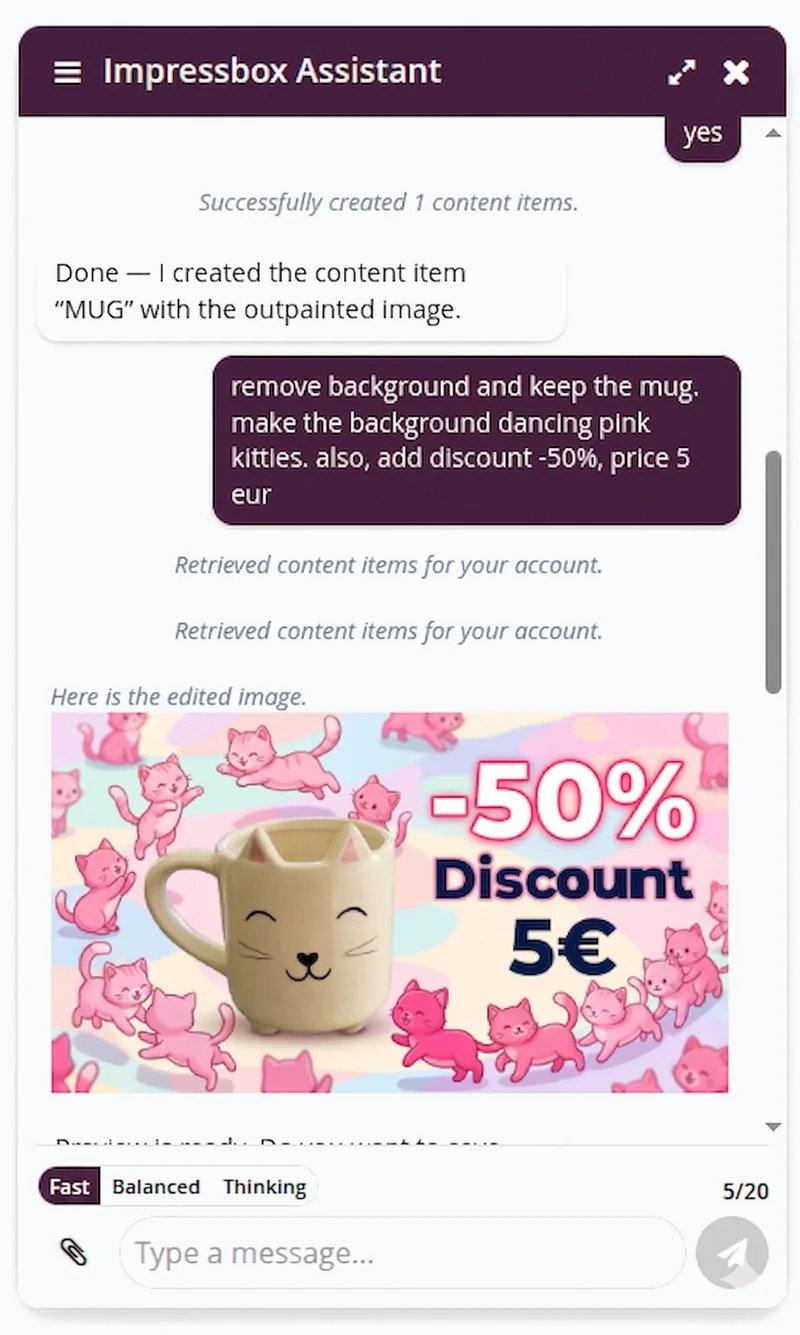
Remove background and keep the mug. make the background dancing pink kitties. also, add discount -50%, price 5 eur
Performs generative AI editing on content. Provides fully ready visual based on user instructions applied to the original image.

Outpainting of content
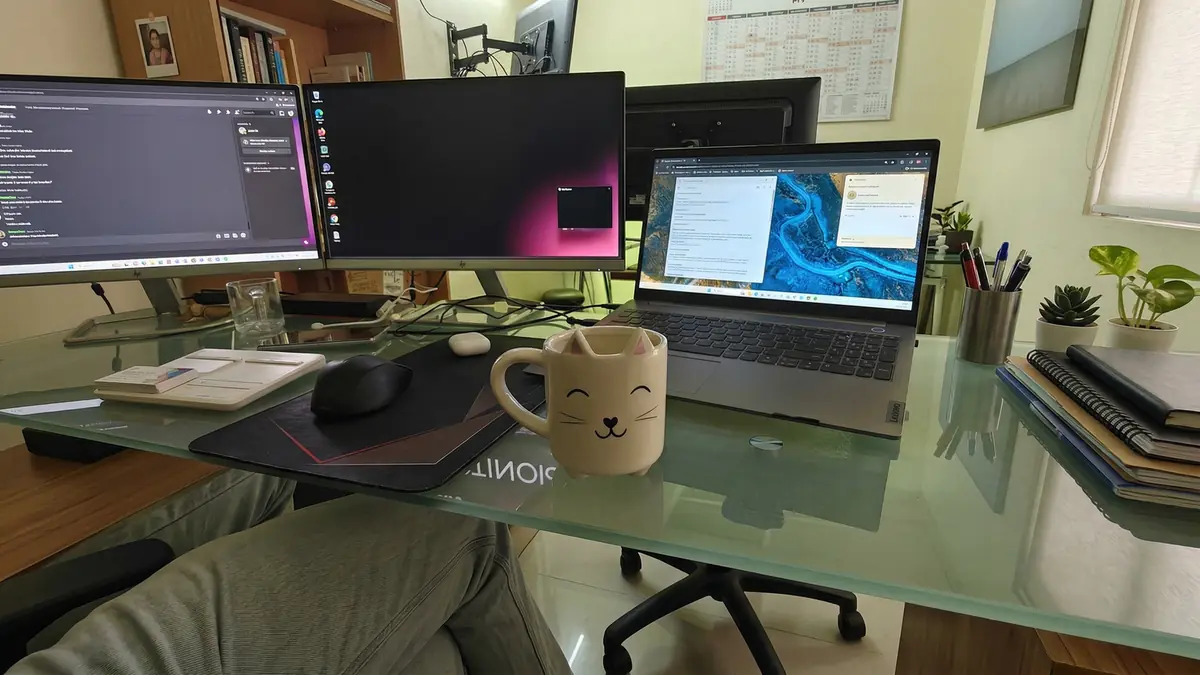
Outpaint this product image to expand the background and context
Extends the boundaries of product images by intelligently expanding the background and surrounding context, creating a more complete and visually appealing composition.


Create a template from image
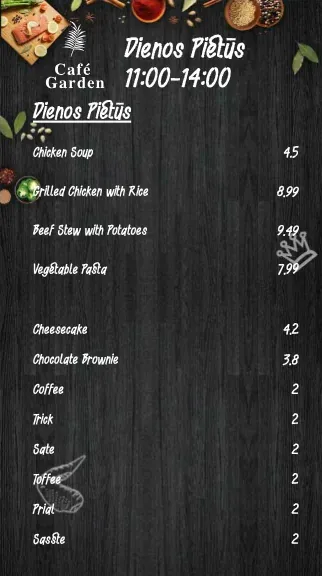
Create template from this image
Agent analyzes the picture, extracts the content schema and creates HTML layout regarding this design that you can very easily create content later on.
Create a content from template
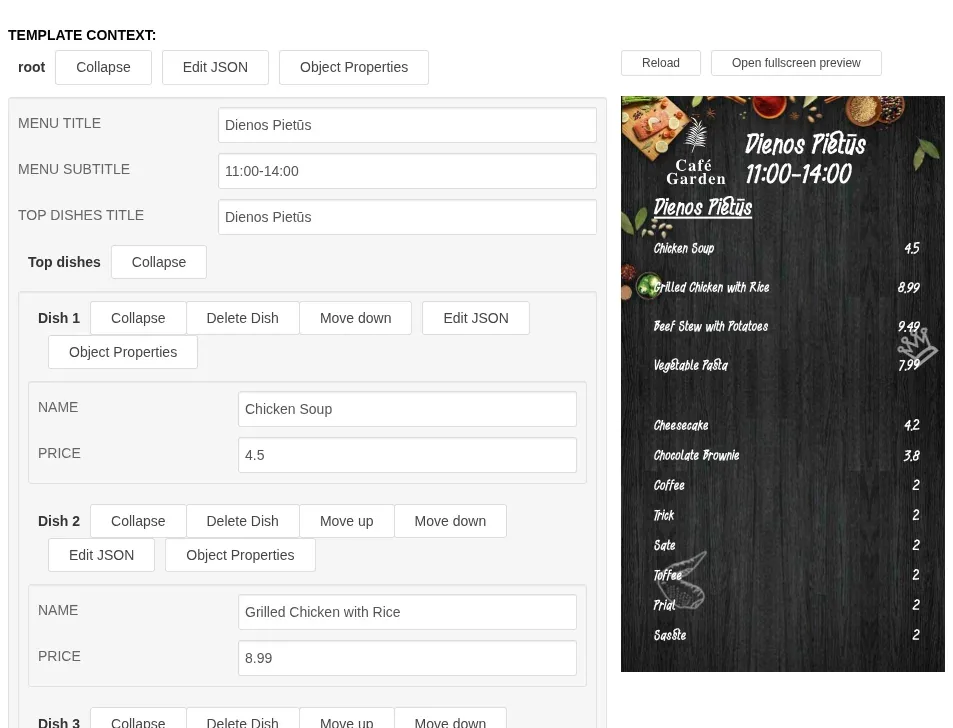
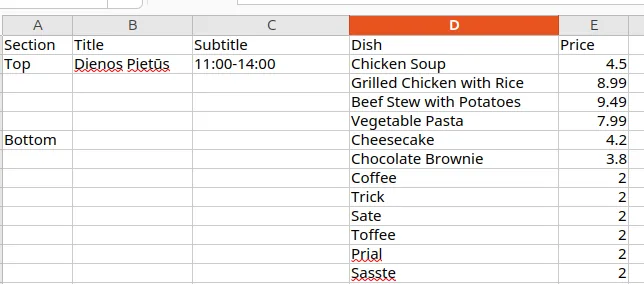
Create item "Daily lunch" using "Daily lunch" template from this data
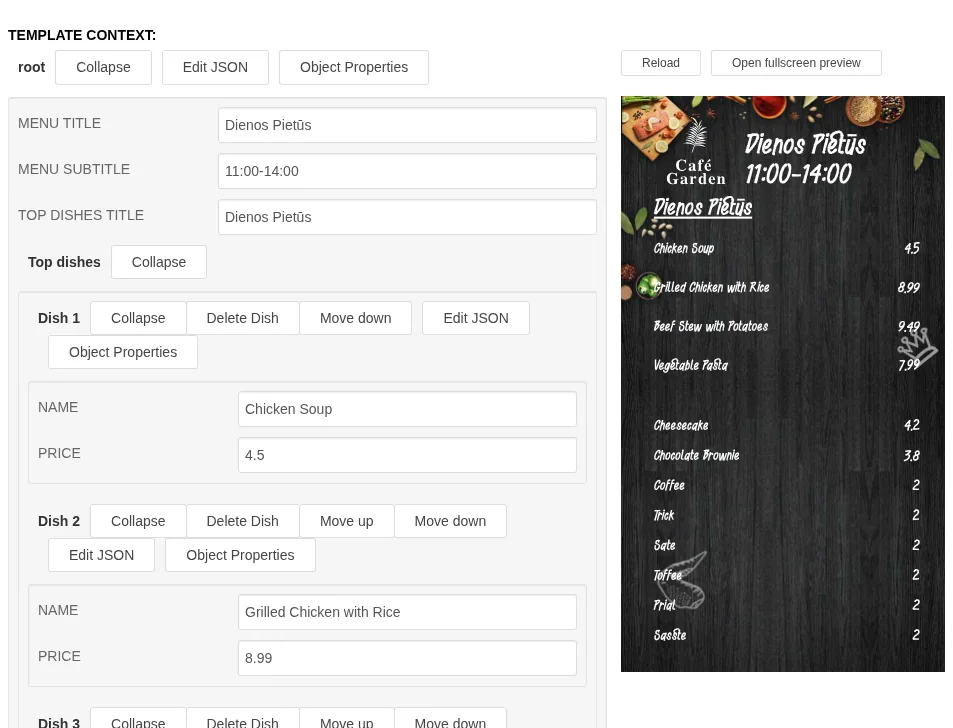
Even if AI editing is really powerful and follows the instructions, there are some situations where you always want the design to remain the same and just manage the data. This is where impressBox templates come to the help: They are custom designed HTML micro applications that can be distributed to displays as HTML or pre-rendered video clip. Then the assistant can change either data or design - separating flows, and avoiding situations where changing a soup price rearranges the design of the template.
Animate or edit template
Animate daily lunch template, zooming in background 30% in 10 seconds
Adds animation or changes HTML layout to your request.
Publishing of new content
Play only this file in device named Lobby. Name this content Mug.
Creates content item and deploys it immediately to the specified destination.
Statistics: Analysis of playback rate
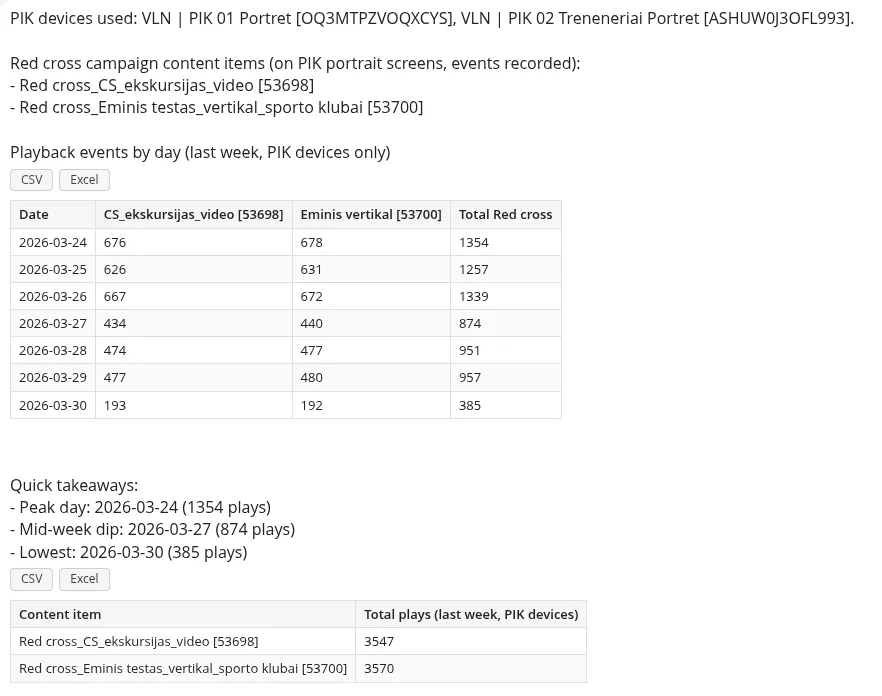
Please make a comparision of playback events for "Red cross" campaing content items for last week, comparing each day. Analyze devices starting with PIK
Fetches data from proof-of-play database which stores playback events. It adapts the query to the request, formats the data, and can perform various analytical tasks or export as CSV or Excel content.
Statistics: Hourly rate
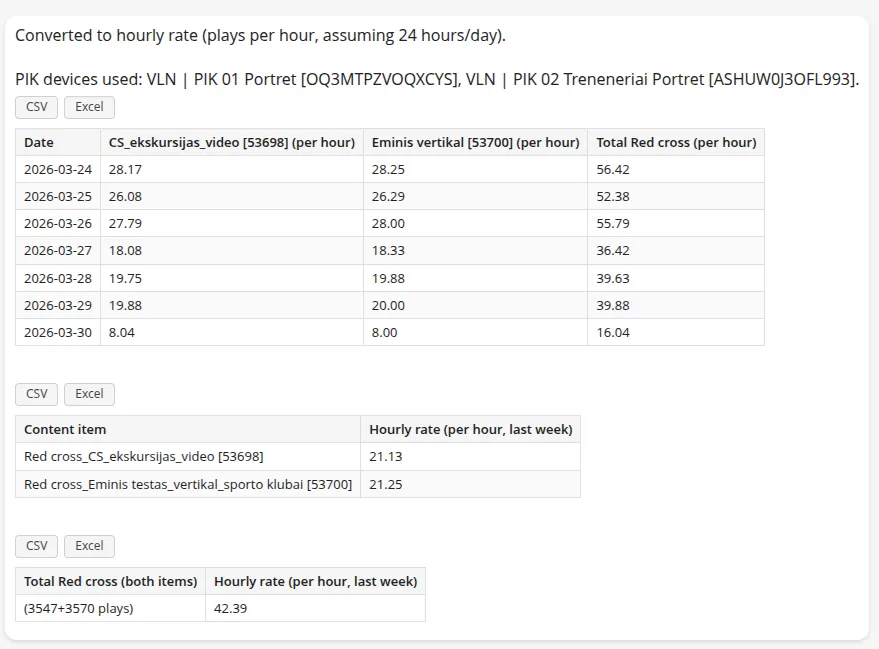
Can you translate into hourly rate instead of absolute numbers
Converts playback data into hourly rates for better analysis and comparison of content performance across different time periods.
Prompt Library
Editing content
Remove background and keep the mug. make the background dancing pink kitties. also, add discount -50%, price 5 eur
Performs generative AI editing on content. Provides fully ready visual based on user instructions applied to the original image.
Outpainting of content
Outpaint this product image to expand the background and context
Extends the boundaries of product images by intelligently expanding the background and surrounding context, creating a more complete and visually appealing composition.
Create a template from image
Create template from this image
Agent analyzes the picture, extracts the content schema and creates HTML layout regarding this design that you can very easily create content later on.
Create a content from template
Create item "Daily lunch" using "Daily lunch" template from this data
Even if AI editing is really powerful and follows the instructions, there are some situations where you always want the design to remain the same and just manage the data. This is where impressBox templates come to the help: They are custom designed HTML micro applications that can be distributed to displays as HTML or pre-rendered video clip. Then the assistant can change either data or design - separating flows, and avoiding situations where changing a soup price rearranges the design of the template.
Editing a template
Please set soup price to 6eur in "Daily lunch" item
If it can find the template matching the item selection, AI analyses its structure and sets the corresponding values. Formats the values so the content would look similar to other entries in the template.
Animate or edit template
Animate daily lunch template, zooming in background 30% in 10 seconds
Adds animation or changes HTML layout to your request.
Publishing of new content
Play only this file in device named Lobby. Name this content Mug.
Creates content item and deploys it immediately to the specified destination.
Statistics: Analysis of playback rate
Please make a comparision of playback events for "Red cross" campaing content items for last week, comparing each day. Analyze devices starting with PIK
Fetches data from proof-of-play database which stores playback events. It adapts the query to the request, formats the data, and can perform various analytical tasks or export as CSV or Excel content.
Statistics: Hourly rate
Can you translate into hourly rate instead of absolute numbers
Converts playback data into hourly rates for better analysis and comparison of content performance across different time periods.
Multiple files workflow
Publish files to their matching devices, specified in second part of filename
Follows the workflow provided from prompt. Advice: Always turn on Thinking model.
Verification of content publishing
Could you verify if devices are really playing revision from previous prompt?
After each content operation which includes publishing, the agent asks to verify if devices really took the latest content. Checks if device actually downloaded content and started to play it back. Highlights issue if device is offline or somehow couldn't download content.
Screenshot of current playback
Make screenshot what screens in KS86 are showing now.
Makes a screenshot of current device output and shows in chat, if successful.
Scheduling of content
Start playing this file tomorrow 12:00
Play this file every working day at 11:00 once
Play these files along currently playing, please extract campaign validity from file name. (eg. 03.17-04.17 in file name)
Schedules a playback of content in desired pattern.
Restriction of content playback
Play these files along currently playing until end of this month.
Play this file only from May until the end of this year.
Adjusts date from..to fields which impose date restriction for provided content.
Rotation of content
Rotate those 3 files each week on all internal communications screens until the end of this year.
Upload this visual to Display X. The visual should be displayed ONLY every two weeks until the end of this year.
Will adjust when to show the clip using "Grid" tool. It will set days or hours when to play content regarding the request.
Brightness control
Set device X brightness to 50%
Schedule device X brightness to 100% at 12:00, reducing to 50% at 17:00
Immediately sets brightness or schedules a fixed brightness pattern.
Volume control
Set device volume to 20%
Changes volume of device.
Device configuration
Set device timezone to Vilnius.
Set display width and height to 384x640
Set output resolution to 3840x2160
Please turn off device backlight at 22:00 and turn it back on at 09:00
Show as configuration actions applied to the selected device.
Device pairing
Add device with pairing code 123456 as NewestDevice
Pairs newly provisioned device.
Application upgrade
Please upgrade application to latest on Justinas device.
Upgrades app to newest version. Currently on LG, Samsung, and Balena.
Rotation of device
Rotate device Lobby 90 CCW
Sets orientation of device. Useful for external players which do not have electronic rotation sensor.
Content composition
Play uploaded files as two columns with first column width of 50%.
Sets a template for custom layout visualisation.
Importing content from YouTube
Create a playlist from the YouTube playlist in the knowledge base file "Business playlist - YouTube" and name it Business2026
Imports content of YouTube playlist with YTAPI as separate content items.
Upload to playlists with an expiry date
Upload these files to the "1920" and "1080" playlists, matching each file to a playlist by the orientation in its file name, and make them expire on 27 May.
Upload this file to the Ads portrait category, set it to expire on 1 June and add it to the "Ads portrait" playlist.
Uploads the files, sets their validity dates and adds them to the right playlists. Nothing goes live on screens until you ask the agent to publish.
Play only on selected screens
Play content 1234 only on screens A12, A15 and B03. Restrict it so it doesn't show anywhere else.
Adds the item where it is needed and sets a device restriction, so other screens that share the playlist skip it.
Clean up playlists
Remove every expired campaign from all playlists, the ones that are struck through in red.
From the Test playlist remove everything except the item whose name contains "spring".
Delete all playlists except "Test".
Finds the matching items, lists what will change and asks you to confirm before it removes anything.
Show a web page or dashboard
Add this web page to the Lobby playlist and show it for 40 seconds: https://example.com/weather
Creates web (remote URL) content from the link, sets its duration and adds it to the playlist. The agent can also check whether a screen will be able to open the page.
Write in your own language
Įkelk šiuos failus į grojaraščius „1920“ ir „1080“ pagal orientaciją failo pavadinime ir nustatyk galiojimą iki gegužės 27 d.
A Lobby lejátszási listát tedd az LG kijelzőre.
Покажи статистику контенту за вчора, тільки з 9 до 18 години.
Pane see pilt koosolekuruumi ekraanile järgmiseks viieks minutiks.
The agent answers in the language of the request. Customers already use it in Lithuanian, English, Hungarian, Ukrainian and Estonian.
Display on and off times
Set display on at 6:00 and display off at 22:00 every day for the "Entrance LED" screen.
Creates a daily on/off schedule on the device, so the screen is dark outside opening hours.
Rename in bulk
Rename these devices by their site code: UK01 Reception Screen, UK01 Food Board, FR02 Entrance Display, FR02 Restaurant Menu. Follow the same logic for the rest.
Works out the naming rule from your example and renames the devices accordingly.
Play count for a period
How many times was promo-video.mp4 played in April?
Reads proof-of-play data for the content item and period and answers with the total, broken down by day.
Investigate an incident from the logs
Investigate from the logs what happened to device Lobby-01 yesterday around 12:00.
Show which tracks were not played on that device yesterday because of their date limits.
Reads the device logs for the time window and explains in plain language what happened, including content that was skipped because of date restrictions.
Why isn't it playing?
Why isn't the big screen showing the new playlist yet?
Checks what the device is actually playing and explains the difference, for example that another item is still running or the playlist has not been published to that screen.
Playlist variations by location
How will the "Entrance screens" playlist play on the entrance screens in different cities? How many variants are there?
Works out which items each screen will actually play once device restrictions and tags are applied, and groups the screens by variant.
Playlist structure review
Analyze all playlists, find tracks that repeat across them and suggest which could be managed with categories.
Reviews the playlists in the account and suggests a simpler structure that is easier to maintain.
Try these prompts with your own content
From one image to ready-to-play screen content, from one instruction to network-wide publishing.
Try the AI Agent