
Integrations
Microsoft Entra ID and Microsoft 365: sign in with the company account and keep customer mail in one place
Your people sign in to impressBox with their Microsoft work account, and your directory decides who gets which role. Each salesperson can also connect their own Outlook so that e-mails and meetings with a customer’s contacts appear on that customer. Both are switched on per account when you ask for them.
What the Microsoft connection does
Two separate parts: who may sign in (Entra ID), and what sales staff see on a customer (Microsoft 365). You can use one without the other.
Sign in with Microsoft
Staff press Sign in with Microsoft on the login page and use their work or school account. There is no separate password to keep.
Read more…Show less
What you do: choose Sign in with Microsoft, pick your work account and come back signed in. People with more than one impressBox account then choose which one to open.
What the platform does: the sign-in uses OpenID Connect with your Entra ID directory. A person who has no directory connection keeps signing in as before.
Single sign-on is switched on per account by an account admin in Settings.
Roles that follow your directory
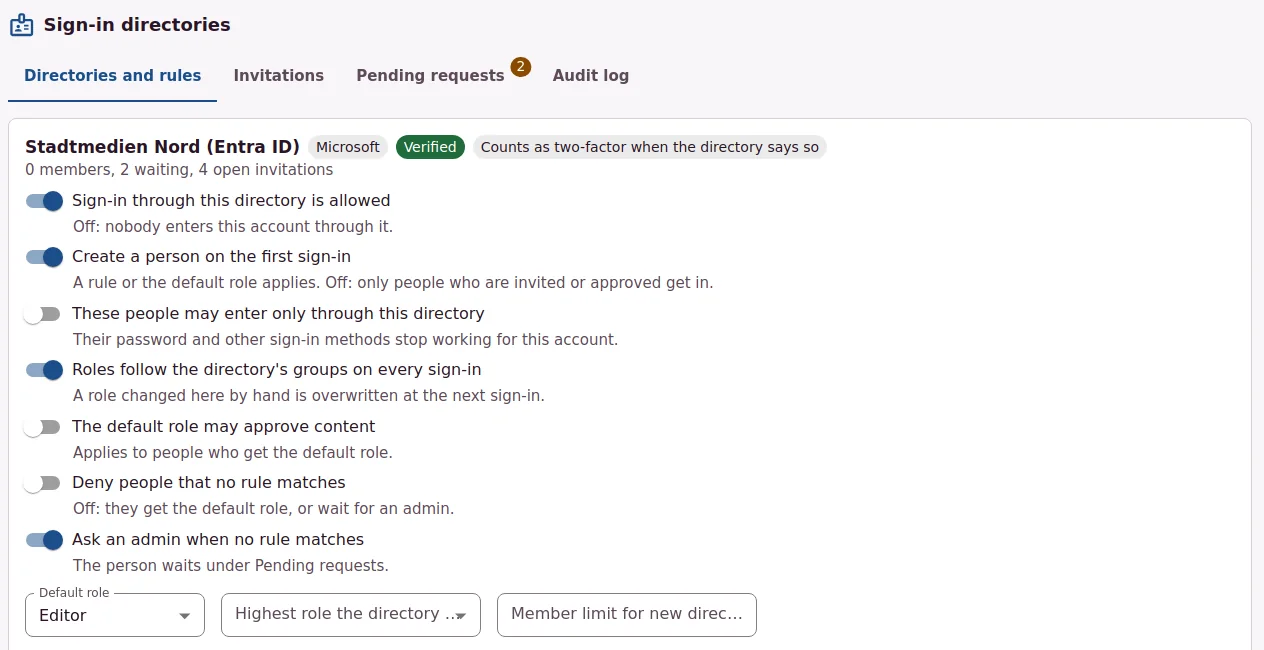
Rules turn directory groups into impressBox roles: Viewer, Contributor, Editor or Admin.
Read more…Show less
A rule can match a directory group, an app role, a department, the ending of the sign-in name, or anyone from the directory. When several rules match, the highest role wins.
The account admin also sets a default role for people no rule matches, the highest role the directory may grant, and an optional limit on how many new people it may add.
Roles can follow the directory on every sign-in, so a role changed by hand is overwritten at the next one. A department is only known when your directory sends it through provisioning.
Join rules, invitations and a log
You decide what happens to a person who signs in for the first time.
Read more…Show less
A new person can be created on the first sign-in, wait for an admin to approve, or be refused. Join codes and invitation e-mails cover people that no rule covers.
A setting can require people from the directory to enter only through it. Switch it on after nearly everyone has linked their account, because anyone with no link and no invitation is locked out.
The account’s audit log lists sign-ins, role changes by the directory and removed memberships, and can be downloaded as CSV.
Second factor from your directory
Multi-factor sign-in done in Microsoft can count, so people are not asked twice.
Read more…Show less
When your directory is set to count and Microsoft reports that the person passed multi-factor authentication, impressBox does not ask again. Otherwise it asks for its own one-time code if the person has set one up.
A directory can also be set to require a second factor. Both settings are made by impressBox together with your IT team.
Provisioning from Entra ID (SCIM)
Your directory tells impressBox when someone joins, moves or leaves, so access follows your own changes.
Read more…Show less
It is optional. Sign-in works without it. impressBox sets it up with your IT team: the Tenant URL and a secret token are handed over once, and one token belongs to one directory and account pair.
Joins follow your rules. A move recalculates the role for that account. When someone leaves the directory their membership ends and an open session ends at its next request; the person and their history stay.
The feature is built and covered by automated tests. There is no screen for it in Settings yet, so the admin of the account does not handle the token.
Portal customers sign in with Microsoft
Advertisers can sign in to a seller’s customer portal with a work or school account instead of a link.
Read more…Show less
The seller registers an app in Entra ID and enters its client ID and secret in the portal settings. The secret is write-only. Personal Microsoft accounts are refused.
Unless the seller lists allowed e-mail domains, any work or school account can sign in. The seller decides what happens when someone nobody knows signs in: by default a draft customer is created and the seller is told, and the seller can hold the sign-in for approval or refuse it.
The same portal sign-in also works with Google, see Google Workspace. The portal itself is described on the customer portal page.
Outlook mail on the customer
E-mails exchanged with a customer’s contact appear as activities on that customer.
Read more…Show less
Each person connects their own Microsoft 365 account once. Inbox and sent items are read about every 15 minutes. A message with an address of one of the customer’s contacts becomes an activity with the subject and, by a setting, a short preview.
The permissions are delegated: they are the person’s own, they ask for no application-wide access, and the person can withdraw the app in their Microsoft account at any time.
Your Microsoft 365 administrator approves the app once if your tenant does not let users consent for themselves.
The mail connection is covered by tests against recorded Microsoft Graph answers and has not yet been run live with a customer tenant, so the first connection is checked together with impressBox.
Outlook meetings and Teams links
Meetings with a customer’s contacts are logged, and a meeting planned in Media Sales can be put in your calendar.
Read more…Show less
Outlook meetings with a contact’s address become meeting activities with start, end, place and attendees. A meeting cancelled in Outlook is marked done with a note, and nothing is deleted.
Put in Outlook creates the event in your calendar, invites the attendees and adds a Microsoft Teams link. Outlook sends the invitations, so the same meeting is not sent as an .ics file as well.
Like the mail connection, this is covered by tests against recorded Microsoft Graph answers and has not yet been run live with a customer tenant.
Alerts in a Teams channel are a separate part. See Slack, Teams and e-mail alerts.
Where the admin sets it up
Settings > Identity and sign-in in Media Sales: the directory, whether it is verified, what happens on a first sign-in, and the default role.
How it is set up, and who does what
Nobody is switched over by surprise. Each step names the person who takes it.
Step 1: Your IT team gives impressBox the directory ID
That is the Tenant ID from the Microsoft Entra admin center. Agree which directory groups should map to which role.
Step 2: impressBox connects the directory to your account
impressBox connects the first directory with you and checks that it is yours, by a sign-in with an account of that directory. Guests of the directory cannot verify it.
Step 3: Your account admin switches on single sign-on and sets the rules
In Settings, the admin turns on Single sign-on, adds rules, chooses the default role and sends invitations. The admin turns on sign-in only through the directory last.
Step 4: Optional: your IT team starts provisioning
In Entra ID, add the Tenant URL and token impressBox gives you as automatic provisioning of an enterprise application, map the object ID, choose users and groups, and start.
Step 5: Optional: each person connects Outlook
impressBox registers the Microsoft 365 app once for the whole platform; until then the feature shows “not set up”. Once it is switched on for the account, each person connects their own Microsoft 365 account and can disconnect it at any time. Your Microsoft 365 administrator approves the app once if needed.
What it does not do
These limits are part of the design.
- It does not switch itself on. Single sign-on and the Microsoft 365 link are both switched on per account.
- It does not copy a mailbox. A message that has no address of a customer’s contact is looked at and dropped, never stored. The full message and attachments are never copied.
- It does not read anyone else’s mailbox. There is no application permission, only each person’s own sign-in.
- It does not read chats, channels or Teams recordings.
- It does not give impressBox staff a role through your directory.
- Provisioning can raise a role that rules based on app roles give, but never lowers or removes one, because it cannot see app roles.
- It does not accept personal Microsoft accounts for portal sign-in.
- It does not replace passwords for people who are not in your directory: they keep their own way in.
Microsoft, Entra, Outlook and Teams are names of Microsoft products. They are used here only to say what impressBox connects to.
Frequently asked questions
Is single sign-on on for everyone?
No. It is switched on per account. An account without a directory connection is unchanged, and its people keep signing in with the password and the methods they use today.
Do we have to use SCIM provisioning?
No. Sign-in and roles work without it. Provisioning only adds automatic changes when people join, move or leave your directory. It is set up together with impressBox.
What does impressBox read from a mailbox?
Only messages that have an address of one of your customer’s contacts. For those it keeps the subject, the date and, by a setting, a short preview, with a link that opens the message in Outlook. Everything else is dropped. Disconnecting deletes the stored tokens and stops the reading.
Can our own multi-factor sign-in count?
Yes, when impressBox sets your directory to count it. If Microsoft says the person passed multi-factor authentication, impressBox does not ask for its own code. Otherwise it asks for its one-time code when the person has one.
Which Microsoft accounts can sign in to the customer portal?
Work and school accounts, from any directory or from the one directory the seller names. Personal Microsoft accounts are refused.
Is this ready for production use?
It is switched on per account together with impressBox. Outlook mail and meetings answer to recorded Microsoft Graph replies in automated tests, and provisioning to automated tests; neither has yet been run with a customer’s Microsoft tenant, so the first connection is made and checked together with impressBox. Ask for a walkthrough on a demo.
Connect your directory the careful way
We set up the first connection with your IT team and check it before anyone is switched over.